
Its reputation was built on innovation and exceptional design. But decades of late-adopted technologies, questionable UX decisions, and fiercely loyal consumers raise an uncomfortable question: how much of that reputation does Apple still deserve?
I have a problem with Apple.
Not because I hate the company or its products. Quite the opposite. A month ago from the time of this posting, I bought a 2026 MacBook Air for my development work. I usually keep two Windows computers, two Linux machines, and one Apple computer in my personal collection. I like having different operating systems at my disposal, and apparently, I also enjoy spending money on products from companies I’m about to criticise.
But that’s precisely the point. I use (some of) Apple’s products. I appreciate what they do well, and I know what they’re capable of. Which makes it particularly frustrating when the company responsible for some of the industry’s most influential products continues to make decisions that leave me scratching my head.
Apple used to represent something genuinely important in the technology industry. It challenged established conventions, made complicated technology accessible, and demonstrated that computers didn’t have to look or behave like equipment designed exclusively for engineers.
Today, however, I question how much of that reputation the company still deserves.
We’re looking at an Apple that repeatedly introduces technologies years after its competitors, makes questionable user interface and user experience decisions, and sometimes takes an astonishing amount of time to implement conveniences that other operating systems have offered for ages.
Yet the company continues to enjoy a reputation for being at the forefront of innovation and design.
That’s what frustrates me.
I’m a UI developer and UX designer. I spend a considerable amount of time examining how people interact with technology, why certain design decisions succeed, and why others create unnecessary friction. Naturally, I hold Apple to a high standard, especially when the company helped establish the importance of user experience in modern computing.
This isn’t an argument that Apple has never invented anything. That would be ridiculous. Nor am I claiming that Android, Windows, or another manufacturer is universally better.
I’m questioning whether Apple’s reputation has become something people defend automatically, even when its products don’t consistently justify that defence.
And, perhaps more importantly, whether we’ve started confusing technological innovation with successful marketing.
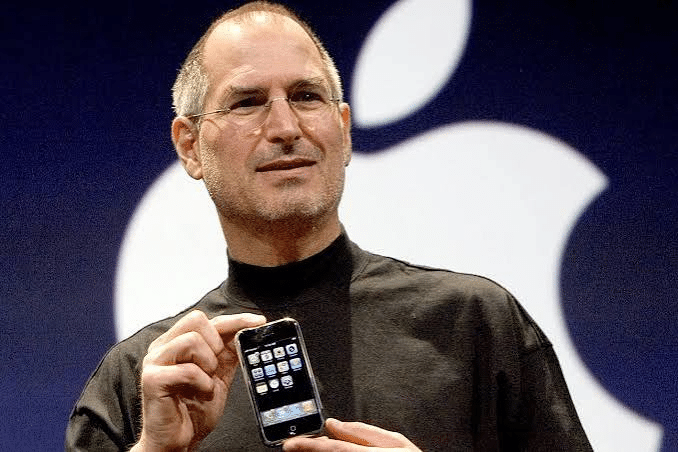
I still remember the Apple of Steve Jobs.
To be fair, I don’t know how many of Steve Jobs’ ideas were genuinely original. Many technologies associated with Apple existed before the company implemented them, and that was true even during his lifetime.
But whatever anyone thinks of Jobs, his influence on consumer technology is difficult to dispute.
In 2001, Apple introduced the iPod. Portable digital music players already existed, but the iPod, together with iTunes and the subsequent iTunes Music Store, helped transform how consumers purchased, organised, and listened to digital music.
Then came the iPhone in 2007.
Again, smartphones already existed. Nokia, BlackBerry, Palm, and other manufacturers had been producing sophisticated mobile devices before Apple entered the market.
But the original iPhone changed the direction of the industry. Its multi-touch interface, software keyboard, and finger-driven navigation helped establish the interaction model that modern smartphones continue to use.
Physical keyboards became less dominant. Touch-centric interfaces became the standard. The smartphone market moved away from many prevailing design conventions of the early 2000s.
Apple didn’t invent every technology that made the iPhone possible. It assembled existing and original technologies into a product that changed consumer expectations.
That’s a substantial achievement.
And there’s a difference between acknowledging that achievement and claiming Apple invented the smartphone.
During that period, Apple was particularly effective at identifying what consumers needed and presenting solutions that were approachable, practical, and commercially successful.
It wasn’t merely adding features. It was changing how people interacted with technology.
That’s the Apple I associate with innovation.
So, what happened?
I don’t believe Steve Jobs’ death in 2011 suddenly made Apple incapable of innovating. That would be an oversimplification, especially considering the company’s subsequent engineering achievements.
But something worth examining has happened to the relationship between Apple’s reputation and its actual contributions.
Innovation, or Arriving Years After Everyone Else?
Here’s what bothers me the most.
Apple has a long history of introducing capabilities that other manufacturers offered years earlier. And I’m not talking about experimental technologies or obscure prototypes. I’m talking about commercially available features that consumers had already been using.
Take three of my favourites.
Home-screen widgets: Android introduced them in 2009. Apple brought widgets directly onto the iPhone home screen with iOS 14 in 2020.
Eleven years.
Keyboard haptic feedback: Android users had enjoyed tactile feedback while typing for years. Apple finally introduced keyboard haptics with iOS 16 in 2022.
Call Screening: Google introduced Call Screen with the Pixel 3 in 2018. Apple introduced its own Call Screening feature with iOS 26 in 2025.
Seven years later.
And there are plenty more. Always-On Displays, ultra-wide cameras, wireless charging, customisable home screens, USB-C, computational photography, and artificial intelligence features all had earlier implementations on competing devices.
I’ve compiled the complete historical comparison in Appendix A.
Now, before somebody argues that Apple simply waits until it can do things properly, I want to make one distinction.
Inventing a technology, improving its implementation, and making it popular are three different achievements.
Apple has demonstrated an exceptional ability to integrate existing technologies into polished products. Its combination of hardware, software, security, and interaction design has historically been one of its greatest strengths.
But improving an existing technology doesn’t mean you invented it.
Nokia’s optical image stabilisation mattered before Apple introduced OIS. HTC’s depth-assisted photography mattered before Apple’s Portrait Mode. Google’s computational photography and phone intelligence mattered before Apple introduced comparable features.
Those companies deserve recognition for their contributions.
And when Apple introduces a genuinely original technology or a distinctive implementation, Apple deserves recognition too.
That’s how technological history should work.
I’m not suggesting that Apple literally copied another manufacturer’s engineering every time it introduced a similar feature. Different companies can develop their own implementations of the same general capability.
What I’m saying is that Apple wasn’t first to commercialise many of the features now associated with the iPhone. I just burst into hysterical laughter when I see those pop-y ads by Apple introducing those “New features”, and there I was saying, “Bugger off! My Samsung phone before this Samsung phone I have right now had that!”
And that historical fact doesn’t change because Apple’s implementation happens to be different (often excellent).
The other interesting part is how these delayed features are received. Something can exist on Android for years, attract relatively little attention outside its users, and suddenly become an important talking point when Apple introduces it.
I suspect the company’s branding and established reputation contribute to that perception.
But perception isn’t technological history.
A manufacturer shouldn’t receive credit for originating a capability simply because its announcement attracted a larger audience.
And that’s why I find the recurring argument that “Apple does it better” insufficient.
Perhaps it does. Let’s examine the implementation and determine whether it’s actually better.
But let’s also acknowledge who got there first.
Part II. The Irony of Apple’s User Experience
As a UX professional, I would expect these decisions to be evaluated through usability testing, task analysis, cognitive load, discoverability, accessibility, and user-control principles.
I don’t know Apple’s internal research findings, so I won’t pretend to know why every decision was made.
But I can evaluate the resulting interaction.
And sometimes, Apple gets it wrong.
Now, here’s the part that bothers me even more.
Apple isn’t merely a technology company that happens to make attractive products. Its reputation is deeply connected to usability, interaction design, visual consistency, and making sophisticated technology approachable.
Which makes some of its UX decisions particularly baffling.
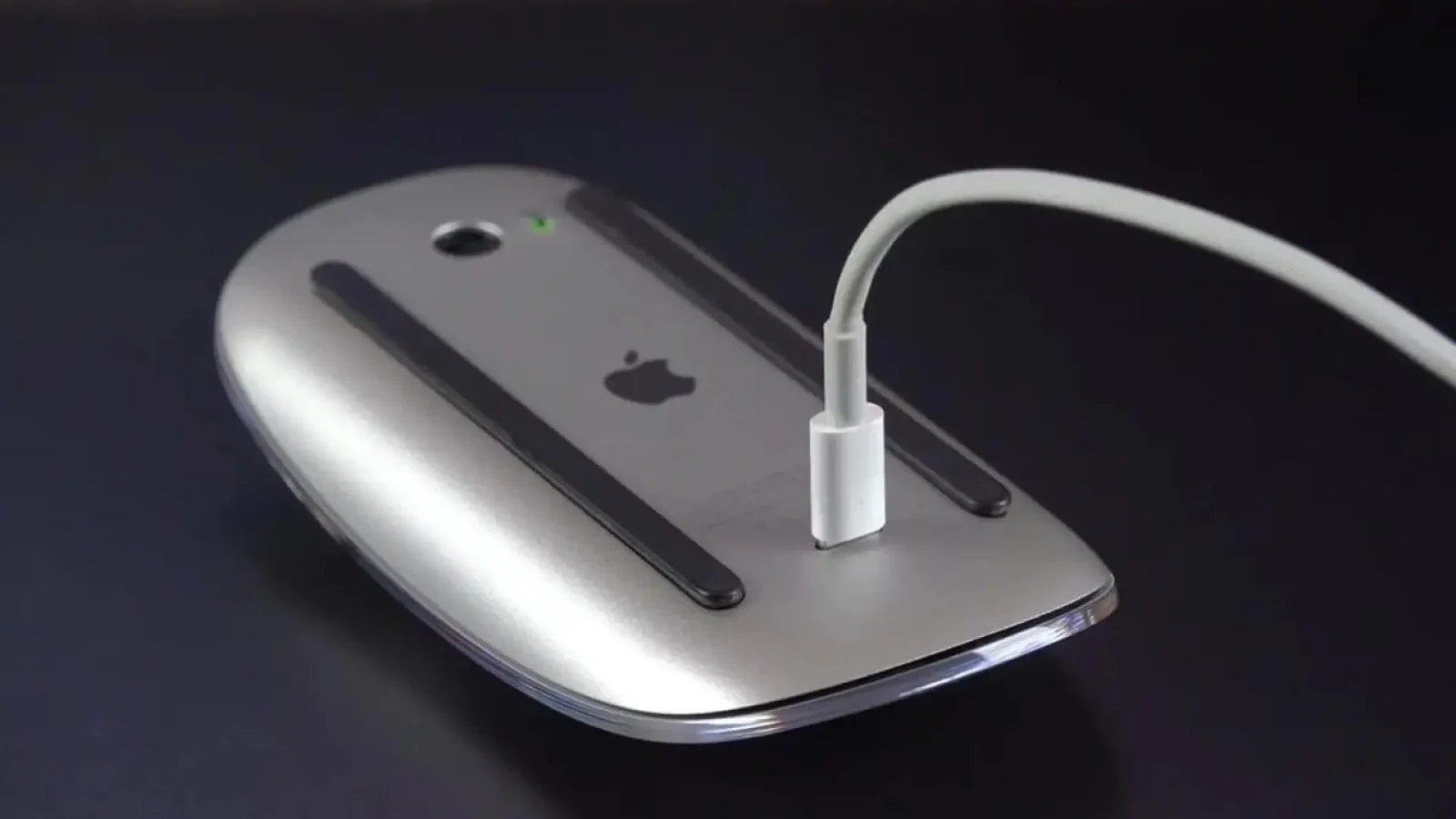
Take the iPhone Camera app, for example, where several important preferences are buried in iOS Settings rather than being directly accessible from Camera. Then there’s macOS Finder, which still lacks a conventional, editable address bar where users can easily view, copy, or paste the current folder’s full path. Instead, users must rely on a separate Path Bar, contextual menus, or keyboard shortcuts for something Windows File Explorer handles directly.
And the cake topper? The Magic Mouse. Apple put the charging port underneath it, making the mouse completely unusable while charging. Decades of expertise in industrial design and user experience, and somehow, nobody thought a mouse should still work when you plug it in.
Three examples. One company renowned for exceptional design.
What the hell were they thinking?
The Magic Mouse is particularly amusing because its limitation comes directly from its physical design. A peripheral that cannot be used while charging is a perfectly predictable inconvenience, regardless of how long its battery lasts.
The Camera settings problem concerns discoverability. If I’m using an application and need to change how it behaves, I naturally expect to find the relevant controls within that application, or at least have a direct route to them.
And window snapping? Windows users had enjoyed that convenience for years while Mac users frequently relied on third-party utilities such as Rectangle or Magnet.
Apple eventually addressed the missing feature, but that doesn’t erase the years when users needed another application to perform such an ordinary task.
These examples illustrate what I consider a recurring problem with Apple’s design philosophy: the tendency to restrict or conceal functionality in the name of simplicity, consistency, or maintaining a particular experience.
Sometimes those restrictions are justified. Security, privacy, reliability, and accessibility are legitimate considerations.
But not every restriction automatically improves usability.
Hiding a control doesn’t eliminate the task a user needs to perform. It can simply make that task harder to discover.
And restricting customisation doesn’t necessarily simplify the experience for everybody. It may make the product less adaptable to people whose workflows differ from Apple’s assumptions.
This is precisely why Apple’s history with user experience makes the situation so ironic.
In the early 1990s, Don Norman, a cognitive scientist and one of the most influential figures in human-centred design, worked at Apple. He helped establish the terminology and professional identity associated with modern User Experience Design, including the title of User Experience Architect.
Apple didn’t invent the entire discipline. Human factors, ergonomics, usability engineering, interaction design, and human-computer interaction existed long before Norman joined the company.
But Apple played an important role in bringing those ideas into consumer technology and treating the overall experience as a fundamental part of product development.
Which makes me wonder why a company with that history continues to produce some remarkably questionable interactions.
A beautiful interface can still be difficult to use. An elegant industrial design can still compromise functionality. And a carefully controlled ecosystem can still create unnecessary friction.
As a UX professional, I would expect these decisions to be evaluated through usability testing, task analysis, cognitive load, discoverability, accessibility, and user-control principles.
I don’t know Apple’s internal research findings, so I won’t pretend to know why every decision was made.
But I can evaluate the resulting interaction.
And sometimes, Apple gets it wrong.
I’ve included my complete running inventory of Apple’s UX and design problems in Appendix C. Several have already been addressed, which is welcome. Others remain unresolved or involve design trade-offs I continue to question.
I’m not asking Apple to turn its operating systems into a complicated collection of settings and controls.
I’m asking it to distinguish between useful simplicity and unnecessary restriction.
A good design should reduce the effort required to accomplish a task.
It shouldn’t simply reduce the number of controls on the screen.
The Problem With Brand Loyalty
Now, I know what happens when somebody criticises Apple.
There will be people who immediately argue that Apple implements existing technologies better than everyone else. Others will defend its restrictions through security, privacy, consistency, or battery efficiency.
And sometimes, they’ll be right.
But these explanations should be evaluated individually. They shouldn’t become universal excuses for every decision Apple makes.
If Apple introduces a capability seven years after Google, we should acknowledge the delay.
If Apple develops a technically superior implementation, we should acknowledge that improvement.
If Apple makes a questionable UX decision, we should be able to criticise it.
None of these positions contradict the others.
The difficulty begins when consumers become so attached to a brand that criticism feels like a personal attack.
I’ve never understood that mentality.
A manufacturer isn’t a football club, a religion, or a family member (actually, it can be the latter). It’s a business selling products.
Your responsibility as a consumer isn’t to defend its reputation. Its responsibility is to provide something worth buying.
And commercial success doesn’t establish that every product decision is correct.
Apple continues to innovate. Its A-series processors, Secure Enclave, Face ID’s TrueDepth implementation, MagSafe, professional video capabilities, and Emergency SOS via satellite are examples of meaningful engineering or product-design contributions. I’ve documented those separately in Appendix B.
Some were pioneering commercial implementations. Others were distinctive applications of existing technologies.
All deserve recognition for what they actually contributed.
But those achievements don’t excuse Apple’s shortcomings elsewhere.
I don’t expect Apple to introduce every feature simply because a competitor already has it. There are genuine engineering, security, privacy, compatibility, and maintenance considerations, especially for a company operating at Apple’s scale.
However, I also don’t believe every delayed feature or missing control can be justified by invoking those considerations.
Sometimes a competitor has already demonstrated that the capability works reliably.
Sometimes it’s a basic convenience.
And sometimes the limitation appears to reflect a deliberate decision about how much control Apple wants its users to have.
Those decisions deserve scrutiny.
Brand loyalty is perfectly reasonable when it reflects consistent satisfaction with a company’s products, support, quality, and ecosystem.
But loyalty becomes less useful when it prevents people from evaluating alternatives or recognising shortcomings.
An Apple user who prefers iOS because of its ecosystem, privacy controls, accessibility features, or integration with other Apple devices has legitimate reasons for that preference.
Likewise, an Android user who prefers broader hardware choices, customisation, multitasking, or file-system control has legitimate reasons for choosing Android.
Neither needs to pretend the other platform has nothing worthwhile to offer.
What bothers me is the absolutist position.
The insistence that Apple’s implementation is automatically superior because Apple made it. The refusal to recognise technologies that existed elsewhere first. This behaviour is particularly amusing:
A feature is apparently pointless when Android offers it.
Then Apple announces it.
Suddenly, it’s a fantastic addition.
Come on, mate.
The company that popularised so many important technological ideas should be especially careful about how originality is understood.
And the company that encouraged the world to think differently should have customers who are willing to think independently about its products.
Apple should be evaluated against the standards that helped establish its reputation, not excused from those standards because of its reputation.
That’s my argument.
And if that upsets somebody whose loyalty to Apple is absolute, perhaps that’s a good reason to examine that loyalty in the first place.
Appendix A: Technologies Apple Adopted After Competitors
This appendix documents historical examples of smartphone capabilities that were available from competing manufacturers, operating systems, or software providers before Apple introduced a comparable iPhone feature.
- Optical image stabilisation (OIS): Nokia — Lumia 920 (2012) → Apple — iPhone 6 Plus (2014).
- Dual-camera depth photography: HTC — One M8 Duo Camera (2014) → Apple — iPhone 7 Plus dual-camera system (2016). Earlier dual-camera smartphones also existed for stereoscopic photography.
- Depth-assisted portrait background blur: HTC — One M8 (2014) → Apple — iPhone Portrait Mode (2016).
- Changing focus after capture: HTC — UFocus on One M8 (2014) → Apple — later post-capture depth and focus controls, including enhanced focus-point editing on iPhone 15 (2023).
- Ultra-wide rear camera: LG — G5 (2016) → Apple — iPhone 11 (2019).
- Dedicated computational night photography: Huawei — P20 Pro (2018), Google — Pixel 3 Night Sight (2018) → Apple — iPhone 11 Night Mode (2019).
- AI-assisted handheld low-light stabilisation: Huawei — P20 Pro AI image stabilisation (2018) → Apple — later computational low-light photography. These are related techniques rather than identical features.
- Periscope-style long-range telephoto camera: Huawei — P30 Pro 5× optical zoom (2019) → Apple — iPhone 15 Pro Max 5× tetraprism camera (2023).
- Macro photography: Earlier Android manufacturers offered dedicated macro cameras and close-focus modes → Apple — iPhone 13 Pro macro photography (2021).
- 40MP/48MP-class smartphone photography: Huawei — P20 Pro 40MP (2018), followed by 48MP Android devices → Apple — iPhone 14 Pro 48MP main camera (2022).
- Pixel binning in high-resolution cameras: Earlier Android camera systems used pixel combining before Apple’s 48MP quad-pixel approach on iPhone 14 Pro (2022).
- 4K video recording: Samsung — Galaxy Note 3 (2013) → Apple — iPhone 6s (2015).
- RAW/DNG photography: Nokia Lumia and Android devices supported RAW capture before Apple introduced broader RAW capture APIs in iOS 10 (2016). Apple ProRAW arrived later as a distinct computational format.
- Motion photographs containing short video sequences: HTC — Zoe (2013), Nokia — Living Images (2014) → Apple — Live Photos (2015).
- Dedicated physical camera shutter/control: Sony — Xperia smartphone camera-button implementations → Apple — Camera Control on iPhone 16 (2024). The controls differ in function and interaction.
- AI-assisted object removal: Google — Pixel Magic Eraser (2021) → Apple — Clean Up (2024).
- Generative AI photo editing: Google and Samsung offered generative editing before Apple’s 2024 Apple Intelligence photo tools. Samsung’s Galaxy S24 introduced Generative Edit in January 2024.
- Extreme high-frame-rate slow-motion recording: Sony — Xperia XZ Premium 960fps (2017), Samsung — Galaxy S9 960fps (2018). Apple offered high-frame-rate slow motion but did not pioneer this capability; this is not an example of Apple later adopting an equivalent 960fps mode.
- Large phablet-style displays: Samsung — Galaxy Note, 5.3 inches (2011) → Apple — iPhone 6 Plus, 5.5 inches (2014).
- OLED/AMOLED smartphone displays: Samsung — Galaxy AMOLED smartphones years earlier → Apple — iPhone X OLED (2017).
- Always-On Display: Samsung — Galaxy S7 and LG — G5 (2016) → Apple — iPhone 14 Pro (2022).
- High-refresh-rate displays: Razer — Razer Phone 120Hz (2017) → Apple — iPhone 13 Pro 120Hz ProMotion (2021).
- Nearly bezel-less, all-screen designs: Sharp, Xiaomi, and Samsung experimented with reduced-bezel smartphones before Apple — iPhone X (2017).
- Water-resistant smartphone construction: Sony — Xperia Z (2013), Samsung — Galaxy S5 (2014) → Apple — iPhone 7 with official IP-rated water resistance (2016).
- Stereo speakers: HTC — One (2013) and earlier competing devices → Apple — iPhone 7 (2016).
- Wireless charging: Palm — Pre Touchstone system (2009), Nokia — Lumia 920 (2012), Samsung — Galaxy S6 (2015) → Apple — iPhone 8 and X (2017).
- Fast wired charging: Qualcomm Quick Charge and compatible Android smartphones supported accelerated charging years before Apple officially introduced fast charging with the iPhone 8 generation (2017).
- USB-C smartphone connector: Android manufacturers introduced USB-C phones in 2015 → Apple — iPhone 15 (2023).
- NFC hardware: Nokia and other manufacturers supported NFC years before Apple introduced it with the iPhone 6 (2014).
- NFC-based mobile payments: Google Wallet and other mobile-payment systems predated Apple Pay (2014).
- 4G LTE: Android LTE smartphones appeared before Apple’s iPhone 5 (2012).
- 5G connectivity: Samsung — Galaxy S10 5G and other Android phones (2019) → Apple — iPhone 12 (2020).
- Dual-SIM smartphones: Widely available on competing mobile devices before Apple added dual-SIM capability to the iPhone XS/XR generation (2018).
- eSIM support: Google — Pixel 2 (2017) → Apple — iPhone XS/XR generation (2018).
- Titanium smartphone construction: Essential — PH-1 titanium frame (2017) → Apple — iPhone 15 Pro titanium design (2023).
- Programmable hardware buttons: BlackBerry and rugged Android devices offered programmable convenience buttons before Apple — Action Button on iPhone 15 Pro (2023).
- Powering accessories through a phone’s USB connection: Android devices with USB On-The-Go and reverse power capabilities predated USB-C accessory charging on iPhone 15 (2023).
- Removing the 3.5mm headphone jack: Oppo — R5 (2014) and Motorola — Moto Z (2016) preceded Apple’s iPhone 7 (2016). This is a chronology comparison, not necessarily an example of a consumer-benefiting innovation.
- Copy and paste: Palm, Windows Mobile, and other platforms supported it before iPhone OS 3 (2009).
- MMS multimedia messaging: Available on earlier mobile phones → Apple — iPhone OS 3 (2009).
- Native video recording: Available on competing smartphones → Apple — iPhone 3GS (2009).
- Third-party application multitasking: Symbian, Windows Mobile, and Android offered multitasking models before Apple introduced its constrained approach with iOS 4 (2010).
- Pull-down notification centre: Android’s early notification shade → Apple — Notification Center in iOS 5 (2011).
- Quick Settings controls: Android and manufacturer interfaces → Apple — Control Center in iOS 7 (2013).
- Home-screen widgets: Android 1.5 (2009) → Apple — iOS 14 home-screen widgets (2020).
- Application drawer/library: Android’s application drawer → Apple — App Library in iOS 14 (2020). The implementations differ, but both organise applications outside the main home-screen layout.
- Picture-in-Picture on smartphones: Samsung and Android implementations preceded Apple — iOS 14 on iPhone (2020).
- Third-party keyboards: Android supported alternative keyboards before Apple — iOS 8 (2014).
- Swipe-to-type keyboards: Swype and Android keyboard implementations around 2010 → Apple — QuickPath in iOS 13 (2019).
- Accessible file manager: Android provided user-facing file management years before Apple — Files app in iOS 11 (2017).
- Native or manufacturer-provided screen recording: Earlier Android manufacturers provided screen recording → Apple — system screen recording in iOS 11 (2017).
- Dark interface/system themes: Windows Phone and Android implementations preceded Apple — system-wide Dark Mode in iOS 13 (2019).
- Battery-saving operating-system modes: Android power-saving modes preceded Apple — Low Power Mode in iOS 9 (2015).
- Keyboard haptic feedback: Android keyboards offered tactile typing feedback for years → Apple — iOS 16 (2022).
- Lock-screen widgets: Android 4.2-era lock-screen widgets and OEM implementations → Apple — iOS 16 (2022).
- Changing default browser and email applications: Android provided broad default-application controls → Apple — limited browser/email defaults in iOS 14 (2020), expanded in later versions.
- Freely positioning home-screen icons: Android launchers offered flexible placement from early releases → Apple — iOS 18 (2024).
- System icon colour and theming: Android launchers and Google’s Material You preceded Apple’s iOS 18 tinted icons (2024).
- Customisable quick-settings layout: Android’s Quick Settings and OEM interfaces → Apple — expanded Control Center customisation in iOS 18 (2024).
- Custom lock-screen shortcuts: Android implementations preceded Apple — configurable lock-screen controls in iOS 18 (2024).
- Application locking and private spaces: Samsung Secure Folder (2017) and other Android solutions → Apple — locked and hidden apps in iOS 18 (2024).
- Battery charge-limit controls: ASUS, Samsung, and other Android manufacturers offered charging limits before Apple introduced selectable charge-limit options in the iPhone 15 generation and later iOS releases.
- Game Mode: Android gaming modes and Google’s Android Game Dashboard preceded Apple’s iOS 18 Game Mode (2024).
- T9 contact search from the phone dial pad: Available on feature phones and Android diallers long before Apple — iOS 18 (2024).
- Scheduled text messages: Google Messages, Samsung Messages, and other applications offered message scheduling before Apple — Send Later in iOS 18 (2024). Apple’s implementation initially focused on iMessage.
- RCS messaging: Android-supported RCS messaging preceded Apple — iOS 18 (2024).
- Audio recording and transcription: Google Recorder on Pixel devices preceded Apple’s deeper audio transcription integration in iOS 18 (2024).
- Native call recording and transcription: Various Android manufacturers supported call recording before Apple — iOS 18.1 (2024), with region-dependent availability.
- Automatic email categorisation: Gmail and Google Inbox preceded Apple’s Mail categories introduced with the iOS 18 release cycle.
- Integrating reminders/tasks into calendar views: Google Calendar and Google Tasks offered comparable integration before Apple strengthened its Calendar and Reminders integration in iOS 18 (2024).
- Camera-based visual search: Google Lens (2017) → Apple — Visual Intelligence beginning with the iPhone 16 generation (2024).
- AI object erasing: Google — Pixel Magic Eraser (2021) → Apple — Clean Up (2024). Also listed under photography because the feature belongs to both categories.
- AI-assisted text rewriting and tone adjustments: Google and Samsung offered comparable writing assistance before Apple Writing Tools in 2024. Samsung’s Galaxy S24 introduced Chat Assist in January 2024.
- AI note summarisation: Samsung — Galaxy S24 Note Assist (January 2024) → Apple Intelligence summarisation features later in 2024.
- Real-time phone-call translation: Samsung — Galaxy S24 Live Translate (January 2024) → Apple — Live Translation in iOS 26 (2025).
- Automatic or assisted call screening: Google — Pixel 3 Call Screen (2018) → Apple — Call Screening in iOS 26 (2025).
- Assistant-managed waiting on hold: Google — Hold for Me (2020) → Apple — Hold Assist in iOS 26 (2025).
- Typing requests to a voice assistant: Google Assistant supported text-based interaction, while Apple also offered an earlier accessibility-oriented Type to Siri capability before its redesigned Apple Intelligence interaction in 2024. This is a comparison of implementations, not evidence that Apple first introduced typing to Siri in 2024.
- AI-assisted suggested replies and message writing: Google and Samsung messaging tools offered comparable assistance before Apple’s later Apple Intelligence writing and reply features.
- On-device transcription: Google Pixel Recorder and other Android implementations offered local speech transcription before Apple’s broader integration of comparable features.
- Intelligent spam and unknown-caller handling: Google’s Pixel Phone capabilities preceded Apple’s later enhanced screening and call-assistance tools. This overlaps with the dedicated Call Screening comparison above.
Appendix B: Apple’s Genuine Innovations and Distinctive Implementations
- 1. Commercial 64-bit smartphone architecture — Apple A7, iPhone 5s (2013). Apple introduced the first commercially available smartphone powered by a 64-bit processor architecture. This was a significant mobile-computing milestone.
- 2. True Tone adaptive flash — iPhone 5s (2013). Apple’s flash system adjusted the colour and intensity of its lighting using multiple LEDs, improving how flash illumination matched ambient colour temperature. Apple presented it as a pioneering camera flash implementation.
- 3. Secure Enclave architecture — iPhone 5s generation (2013). Apple developed a dedicated security architecture for isolating sensitive operations and protecting data. Hardware-backed secure environments existed elsewhere, but Secure Enclave is Apple’s particular implementation.
- 4. Face ID with TrueDepth — iPhone X (2017). Facial recognition wasn’t new, but Apple’s structured-light depth-sensing hardware and secure authentication integration represented a distinctive implementation.
- 5. Ultra Wideband integration — U1 chip, iPhone 11 (2019). Apple brought UWB-based spatial awareness into its smartphone ecosystem, supporting precise device-location and proximity capabilities. The broader UWB technology existed before Apple adopted it.
- 6. MagSafe for iPhone — iPhone 12 (2020). Apple combined magnetic alignment, wireless charging, and an accessory ecosystem into a phone-specific implementation. Wireless charging itself was not invented by Apple.
- 7. LiDAR Scanner integration — iPhone 12 Pro (2020). Apple incorporated LiDAR-based depth sensing into its Pro smartphone for applications including augmented reality and photography. Other smartphones had previously offered depth sensing using different technologies.
- 8. Native Dolby Vision HDR capture and editing — iPhone 12 generation (2020). Apple introduced an integrated workflow for capturing, editing, and sharing Dolby Vision HDR video on a smartphone.
- 9. ProRes recording on iPhone — iPhone 13 Pro (2021). Apple extended its professional ProRes recording format and workflow to a smartphone, strengthening the connection between mobile video capture and professional post-production.
- 10. Dynamic Island — iPhone 14 Pro (2022). Apple transformed the area surrounding its camera and sensor cutout into an interactive interface for ongoing activities and contextual information. Camera cutouts existed earlier, but this particular interaction model was Apple’s implementation.
- 11. Guided Emergency SOS via satellite — iPhone 14 (2022). Apple integrated satellite connectivity, a guided emergency interaction, location information, and a supporting relay service. Other companies had satellite communication capabilities, but Apple’s particular emergency-response workflow was distinctive.
- 12. Finger-driven multi-touch as the central smartphone interaction model — original iPhone (2007). Apple didn’t invent capacitive touchscreens or multi-touch research. Its major contribution was making direct finger manipulation, flicking, scrolling, pinching, and a software keyboard fundamental to an influential mass-market smartphone experience.
Appendix C: Apple’s UX and Design Problems
The following is my running inventory of Apple UX and design criticisms across iPhone, macOS, Apple Watch, iPad, Family Sharing, and hardware.
iPhone / iOS
- Camera settings are fragmented between the Camera app and Settings, with no obvious in-app shortcut to all Camera settings.
- Many Apple apps place important settings outside the app in iOS Settings without providing a direct shortcut from the app itself.
Alarm snooze duration is fixed rather than allowing users to choose a custom snooze time.(Apple finally fixed it in 2025 with iOS 26.)- Personal Hotspot lacks basic management controls: custom SSID, data limits, session-time limits, maximum connected-device limits, and a user-configurable idle auto-off timer.
- Notification settings do not provide consistent system-wide control over individual app sounds and notification categories.
- The iOS App Switcher has no “Close All” action, requiring apps to be dismissed individually.
- iOS does not provide a full native clipboard-history manager with persistent history, search, pinning, and instant global access.
- Photos makes bulk selection and deletion less direct and discoverable than it needs to be.
- Mail makes bulk actions such as Select All and Delete unnecessarily buried or inconsistent, especially across IMAP accounts.
- iOS does not provide a universal per-app “Clear Cache” control without deleting or offloading the app.
- iOS does not allow users to freely choose default apps for all major categories such as Camera, Maps, and Music.
- Standard iPhones do not support proper side-by-side split-screen multitasking.
- Apple’s stock iPhone keyboard does not offer an optional permanent number row.
- AirDrop does not let users freely choose how long “Everyone” discoverability should remain enabled.
- Apple Card payment UX does not make arbitrary extra payments and early installment payments sufficiently obvious, instead emphasizing suggested amounts and separating important payment controls into secondary flows.
- iPhone file management still does not provide the same level of direct file-system access and control expected from a desktop-class operating system.
macOS / Finder
- Finder lacks a conventional, editable address bar. Unlike Windows File Explorer, Finder doesn’t provide a persistent address bar where users can directly view, select, copy, paste, or edit the current folder’s full path. Instead, users must rely on the optional Path Bar, contextual menus, or keyboard shortcuts. These methods work, but they’re unnecessarily indirect for such a basic file-management task, especially for developers who frequently need absolute file paths.
- Finder does not provide the conventional Cut → Paste workflow for moving files, instead requiring users to know Apple’s Copy → Move shortcut.
- Pressing Return on a selected Finder item renames it instead of opening it.
- Finder hides the full folder path by default instead of keeping location context persistently visible.
- macOS does not provide a native per-app volume mixer.
- macOS does not provide straightforward native per-app audio-output routing.
- macOS does not provide a consistent centralized application uninstaller that reliably removes applications and their associated files.
- macOS does not provide a full-featured, immediately accessible clipboard manager comparable to utilities such as Maccy.
macOS does not provide native Windows-style edge and corner window snapping, requiring tools such as Magnet or Rectangle.(Apple finally fixed it in 2024 with macOS Sequoia 15.)- MacBook display notches can obscure menu-bar items when applications use a large amount of horizontal menu space.
- macOS can make external audio-device selection unnecessarily inconsistent or difficult to manage.
macOS does not give users straightforward manual control over the maximum battery charge percentage.(Apple finally fixed it in 2026 with macOS Tahoe 26.4 on Apple-silicon Macs.)
Apple Watch
- Apple Watch tracks steps but does not treat step count as a first-class built-in watch-face complication.
- Apple Watch notifications are generally routed to either the Watch or iPhone rather than letting users choose, per app, to receive alerts on both simultaneously.
iPad / iPadOS
- A personally owned iPad does not support normal multi-user profiles for different household members.
iPad does not include a native Calculator app.(Apple finally fixed it in 2024 with iPadOS 18.)iPad does not include Apple’s native Weather app.(Apple finally fixed it in 2022 with iPadOS 16.)- iPadOS still restricts desktop-class control and multitasking despite high-end iPads being positioned as laptop-class devices.
Family Sharing
- Family Sharing relies too heavily on a single family organiser, preventing a second parent or guardian from having fully equal administrative and payment-management authority.
Apple Hardware
- Magic Mouse charging port is on the underside, making the mouse unusable while charging.
Cross-Platform / Ecosystem
- Apple frequently hides important functionality behind secondary menus or non-obvious gestures instead of exposing it where users naturally expect to find it.
- Apple does not consistently provide direct links from apps to the relevant Settings or System Settings page.
- Equivalent settings and controls are not consistently located or presented across iPhone, iPad, Mac, Apple Watch, and Apple’s first-party apps.
- Apple often restricts user customisation even where additional optional controls could be added without changing the default experience for ordinary users.
Legal
This is an independent opinion and historical analysis. It is not affiliated with, endorsed by, or sponsored by Apple or any competing manufacturer. All product names and trademarks belong to their respective owners.